Templates
If you remember from our discussion of stacks and queues, we said that these were two instances of abstract data types.
This meant that, for example, stacks had the FILO behavior, and as long as this behavior is honored, any stack implementation can decide the details for itself.
We noted that one detail that should be in a stack implementation is that it should be type agnostic, i.e., I can have a stack of whatever types I want:
  int main () {
      stack<int> intsOnInts;
      intsOnInts.push(4);
      intsOnInts.push(20);
      intsOnInts.push(-2);

      stack<string> weave;
      weave.push("bad");
      weave.push("puns");
      weave.push("return");
  }
Along with this point, we said that, to keep things simple, we wanted to talk about a stack of only one type (for the present). So:
  int main () {
      stack<int> intsOnInts;
      stack<string> weave;
      // weave.push(-2); BAD!
      // intsOnInts.push("bad"); BAD!
  }
But this begs the question: how do I have stacks that can handle ints, strings, or whatever types I want them to handle? Is there a different stack type defined for whatever type I want to stack?
No! We used templates!
Templates are a C++ language feature that allow functions and classes to operate with generic types.
A generic type is a sort of placeholder for a type that will be matched as needed during compilation.
Using templates, we can define functions and classes that work for a variety of different types without having to explicitly create multiple function and class definitions, one for each type.
So what does the syntax for a template look like? Let's start by discussing them for functions:
A function template is defined for some number of generic types with the following syntax:
  template <typename TypeOneName, typename TypeTwoName, ...>
  returnType nameOfFunction (...parameters...) {
      // ... function body ...
  }
Now, say I wanted to have a function that compares two types and determines which one is "greater."
For many types, we have a good understanding of what this means:
An int, int1 is greater than int2 if int1 - int2 > 0; i.e., if the quantity of int1 is greater than int2
A char operates the same way, except we examine character codes and perform the same comparison.
A string s1 is greater than a string s2 by examining each character in the sequence one by one and determining which comes first in the alphabet.
Without templates, we would need to define 3 different functions for the above:
  int maximum(int i1, int i2) {
      return (i1 > i2) ? i1 : i2;
  }

  char maximum(char c1, char c2) {
      return (c1 > c2) ? c1 : c2;
  }

  string maximum(string s1, string s2) {
      return (s1 > s2) ? s1 : s2;
  }

  int main () {
      string s1 = "test",
             s2 = "this";
      cout << maximum(s1, s2) << endl;

      int i1 = 20,
          i2 = 8;
      cout << maximum(i1, i2) << endl;
  }
Immediately we see that there are syntactic similarities between our three max functions, not to mention the code repetition.
Let's fix it using a template:
  template <typename T>
  T maximum(T i1, T i2) {
      return (i1 > i2) ? i1 : i2;
  }

  int main () {
      string s1 = "test",
             s2 = "this";
      cout << maximum(s1, s2) << endl;

      int i1 = 20,
          i2 = 8;
      cout << maximum(i1, i2) << endl;
  }
Well that's handy... so is this template some magical one-stop function that handles all of these different cases?
NO! Templates work like this:
A template function defines a "prototype" function that, during compilation, will be forked into a matching one for the type that wants to use it.
So, when we call maximum with the 2 strings, our compiler sees the matching template expecting 2 string parameters, and then creates its own, copied function implementation where
typename T is replaced by string
Similarly, when the compiler sees maximum called with 2 int parameters, it forks yet another copy from the prototype where typename T
is replaced by int
The process by which the compiler finds matches between a function call and a template is called argument deduction.
Remember: templates are not functions, they are *patterns* for functions that are then created by the compiler when they see that they are needed.
Sometimes, the compiler will fail at argument deduction:
Will the following code compile? If so, what will it print?
  template <typename T>
  T maximum(T i1, T i2) {
      return (i1 > i2) ? i1 : i2;
  }

  int main () {
      int i = 22;
      double d = 22.2;
      // [!] Will this work?
      cout << maximum(i, d) << endl;
  }
Hmm, so why didn't that work?
When templates define a generic type, e.g. typename T, then parameters defined in terms of that generic type must be EXACT matches.
This means that template <typename T> T maximum(T i1, T i2) says, "You can match me as long as T i1 and T i2 are EXACTLY the same type."
This strict rule is different than what we're used to because ints and doubles can usually be coerced into one another quite easily.
Such is not the case for templates, where an exact match is required.
A template ambiguity is an error when our compiler fails to deduce the correct argument type for a call to a template function.
To solve this, we can give our compiler a hint as to which implementation we want to use; we do this in our function call by saying:
  template <typename T>
  T maximum(T i1, T i2) {
      return (i1 > i2) ? i1 : i2;
  }

  int main () {
      int i = 22;
      double d = 22.2;
      // [!] Notice the hint we gave to our compiler suggesting
      // that the call to maximum should now expect two doubles,
      // which means we'll simply coerce argument i into a double
      cout << maximum<double>(i, d) << endl;
  }
Cool, so that gives us a little more control over our templates arguments, but what about the following:
Examine how maximum is being used below and its intended use with parameters of type ProtoForneyMon. Will the following code compile?
  class ProtoForneyMon {
      private:
          int m_health;
      public:
          ProtoForneyMon (int h) {
              m_health = h;
          }
          int getHealth () {
              return m_health;
          }
  };

  template <typename T>
  T maximum(T i1, T i2) {
      return (i1 > i2) ? i1 : i2;
  }

  int main () {
      ProtoForneyMon p1(10), p2(15);
      // [!] I'd like to compare two ProtoForneyMon
      // (the early sketch of the hit-game ForneyMon)
      // and return the health of the one that has more
      cout << maximum(p1, p2) << endl;
  }
Well that's a problem... I want my maximum function to behave in a way that's an exception to the template!
No problem! We'll just create our own definition for how to handle two ProtoForneyMon parameters:
  // ... ProtoForneyMon defined here ...

  template <typename T>
  T maximum(T i1, T i2) {
      return (i1 > i2) ? i1 : i2;
  }

  // [!] Overload maximum with an implementation specific
  // to ProtoForneyMon
  int maximum(ProtoForneyMon p1, ProtoForneyMon p2) {
      int h1 = p1.getHealth(),
          h2 = p2.getHealth();
      return (h1 > h2) ? h1 : h2;
  }

  int main () {
      ProtoForneyMon p1(10), p2(15);
      cout << maximum(p1, p2) << endl;
  }
Nice, but why didn't my compiler try to perform argument deduction using the template and still blow up?
The compiler will always check for explicit function specializations (no templating) for function call matches before attempting to perform type deduction using a function template.
Partial Templates
So far we've seen templates where all parameter types are generic, but it's also possible to mingle generic types and explicit ones.
Let's use this section to develop the maxInArray function, which takes in an array of some generic type and then returns the maximum element.
  template <typename T>
  T maximum(T i1, T i2) {
      return (i1 > i2) ? i1 : i2;
  }

  template <typename T>
  T maxInArray(T* arr, int size) {
      if (size <= 0) {
          return NULL;
      }

      // Seed our max with the first
      // element
      T currentMax = arr[0];
      for (int i = 1; i < size; i++) {
          currentMax = maximum(currentMax, arr[i]);
      }
      return currentMax;
  }

  int main () {
      int i[] = {4, 5, 2, 3};
      cout << maxInArray(i, 4) << endl;

      string s[] = {"max", "me", "now"};
      cout << maxInArray(s, 3) << endl;
  }
I might also want to be able to provide multiple generic types in a function definition, like comparing two arrays for equivalence.
Let's make an arraysEqual function that is designed to compare two arrays of generic types that support the equivalence operation:
  template <typename Type1, typename Type2>
  bool arraysEquivalent (Type1* arr1, Type2* arr2, int size) {
      for (int i = 0; i < size; i++) {
          if (arr1[i] != arr2[i]) {
              return false;
          }
      }
      return true;
  }

  int main () {
      int i[] = {48, 49, 50, 51};
      char c[] = {'0', '1', '2', '3'};
      cout << arraysEquivalent(i, c, 4) << endl;

      double d[] = {48, 49.5, 50.3, 51.2};
      cout << arraysEquivalent(i, d, 4) << endl;
  }
Remembering that templates are patterns for functions, we see that the compiler deduced Type1 -> int and Type2 -> char in the first call to arraysEquivalent, and then deduced Type1 -> int and Type2 -> double in the second call.
Summary
When designing function templates, we need to double check three key points for our function calls, pretending we're the compiler trying to make sense of the templates:
The call must match a template; if it doesn't, we either need to create an explicit specification to be compatible with the argument types, or give our compiler a template hint in the function call
Once a match has been made (successful argument deduction), the matching template's code must compile; recall that our ProtoForneyMon matched the maximum template, but the maximum function compared its parameters using the '>' operator, which was not defined for two ProtoForneyMon.
The resulting function, once matched and compiled, must perform the intended behavior; the maximum of two pointer addresses may not behave as intended if the pointers are to elements in different arrays (for example)!
Miscellany
A couple last remarks that don't fit well into any other section:
Attempt to make template function parameters passed by constant reference where possible; since the function could possibly work on large, user-defined types as well as built-in types, the cost of passing parameters by value can be significant.
If you need to initialize a generic type to the "0" equivalent defined by the class (e.g. 0 for ints, "" for strings) you can simply declare (for typename T): T();
Class Templates
Just as we have templates for different function parameters, so can we have templates for our own classes!
This means that whenever I create a new object of a particular type, I can define a type to use for the generic type described in the class template.
We've already seen this in action with the Standard Template Library (STL) stacks, like from the start of this lecture:
  int main () {
      stack<int> intsOnInts;
      intsOnInts.push(4);
      intsOnInts.push(20);
      intsOnInts.push(-2);

      stack<string> weave;
      weave.push("bad");
      weave.push("puns");
      weave.push("return");
  }
We know, then, that the stack class must have a class template that allows us to use stack in conjunction with whatever types we want (int and string in our example).
Similar to function templates, class templates allow us to define a multitude of classes from a single pattern.
The syntax is the same as function templates, with one exception; let's look at a simple example:
  template <typename Type1, typename Type2>
  class TwoTypes {
      private:
          Type1 m_t1;
          Type2 m_t2;
      public:
          TwoTypes (Type1 t1, Type2 t2) {
              m_t1 = t1;
              m_t2 = t2;
          }

          // [!] What is being returned here?
          // Can we predict what a given argument
          // deduction will resolve to?
          Type1 arbitraryFunc () {
              return m_t1 * m_t2;
          }
  };

  int main () {
      TwoTypes<int, int> tII(2, 3);
      cout << tII.arbitraryFunc() << endl;

      // [!] This line may give you warnings;
      // do you see why?
      TwoTypes<bool, double> tBD(true, 2.3);
      cout << tBD.arbitraryFunc() << endl;
  }
No surprises there, we're used to templating; there's just one issue if we try to define member functions outside of the class definition:
  template <typename Type1, typename Type2>
  class TwoTypes {
      private:
          Type1 m_t1;
          Type2 m_t2;
      public:
          TwoTypes (Type1 t1, Type2 t2);
          Type1 arbitraryFunc ();
  };

  // [!] Observe; I need to list the template types above
  // each function definition
  template <typename Type1, typename Type2>
  // [!] Furthermore, I need to define that this is a function
  // on a TwoTypes object with template types <Type1, Type2>
  TwoTypes<Type1, Type2>::TwoTypes (Type1 t1, Type2 t2) {
      m_t1 = t1;
      m_t2 = t2;
  }

  template <typename Type1, typename Type2>
  Type1 TwoTypes<Type1, Type2>::arbitraryFunc () {
      return m_t1 * m_t2;
  }

  int main () {
      TwoTypes<int, int> tII(2, 3);
      cout << tII.arbitraryFunc() << endl;

      TwoTypes<bool, double> tBD(true, 2.3);
      cout << tBD.arbitraryFunc() << endl;
  }
So, just make sure you treat any template member function definitions outside of the class definition as though they were blind to the template types that the class was created with.
That was a nice sentence.
As a final note, you should be aware that you can program the same explicit specification for template member functions that we did for template functions.
For example, if I wanted TwoTypes' arbitraryFunc to handle bools specially, I could write:
  template <typename Type1, typename Type2>
  class TwoTypes {
      private:
          Type1 m_t1;
          Type2 m_t2;
      public:
          TwoTypes (Type1 t1, Type2 t2);
          Type1 arbitraryFunc ();
  };

  template <typename Type1, typename Type2>
  TwoTypes<Type1, Type2>::TwoTypes (Type1 t1, Type2 t2) {
      m_t1 = t1;
      m_t2 = t2;
  }

  template <typename Type1, typename Type2>
  Type1 TwoTypes<Type1, Type2>::arbitraryFunc () {
      return m_t1 * m_t2;
  }

  // [!] 2 Bool specification
  bool TwoTypes<bool, bool>::arbitraryFunc () {
      cout << "[Bool specification]" << endl;
      return m_t1 || m_t2;
  }

  int main () {
      TwoTypes<int, int> tII(2, 3);
      cout << tII.arbitraryFunc() << endl;

      TwoTypes<bool, bool> tBD(true, false);
      cout << tBD.arbitraryFunc() << endl;
  }
And that's all we have to say about templates for now! Handy eh?
Not a whole lot new under the sun, but you have some new coding tools under your belt to simplify otherwise bulky code.
[!] WARNING: Template class definitions work differently with file organization than with non-templated classes.
If your code is not compiling because you've tried splitting your templated class definition in a header and then the function implementations in a .cpp, you might be having issues.
This C++ quirk is described here, along with the possible resolutions: Stack Overflow Article
Advanced Templates
STL Template Functions
We'll talk about STL in depth next week, but templating with standard template library objects is a little bit different than with others.
Performing some hand waving for the moment, let's say we wanted to accept any STL collection in some function, and then perform some operation using its iterators.
We can use the following syntax:
  template<typename T>
  void printElements (T& collection) {
      for (T::iterator it = collection.begin(); it != collection.end(); it++) {
          cout << (*it) << endl;
      }
  }

  int main () {
      int i[] = {5, 6, 1, 20, 22};
      vector<int> vi(i, i+5);

      string s[] = {"this", "example", "rox"};
      list<string> sl(s, s+3);

      printElements(vi);
      printElements(sl);
  }
Notice here that saying our printElements takes a template type T by reference allows the compiler to infer the iterator type when we use it internally.
Template Template Functions
...so you can template while you template.
Say I had the following class / struct template:
  template<typename K, typename V>
  struct Example {
      K k;
      V v;
      Example(K kP, V vP) {
          k = kP;
          v = vP;
      }
      K& getKey () {
          return k;
      }
      V& getVal () {
          return v;
      }
  };
Now, I want to make a non-member function that accepts Example objects with different templated fields, but how do I then reference those field names in the function?
For example, I might create a new Example object like: Example<int, string> e; or Example<char, char> e;
Above, the first Example object has its template K matching the int builtin type and V matching the string class. In the second example K and V both match to the char builtin type.
Now, I want to make a function that can operate knowing what types K and V refer to in a passed-in template class (Example) object.
The syntax is funky, so let's take a look:
  template<template<typename, typename> class Container, typename K, typename V>
  void printAddedElements (Container<K, V>& c) {
      K keyDup = c.getKey() + c.getKey();
      V valDup = c.getVal() + c.getVal();
      cout << "KeyDup: " << keyDup << endl;
      cout << "ValDup: " << valDup << endl;
  }
There are a couple of lines in the function signature to scrutinize:
template<template<typename, typename> class Container, typename K, typename V>
This line says: "Expect a container (called Container) with two template parameters", and then I provide two typenames K and V (which, at this point, aren't connected to the Container).
I'll preempt your next question:
What's the difference between declaring a template class with the keyword class vs
typename?
There's one case where it matters to your compiler which to use: when you're templating a function with a class template (in the case where we have an Example template class, we want a way to refer to the types that the particular Example parameter was created with). Otherwise, the two are *functionally* equivalent, but *conventionally* different, whereby we sometimes like to refer to objects that are class / user defined objects with the "class" keyword, and types that can also be built-in objects with the "typename" keyword.
The other line of importance:
void printAddedElements (Container<K, V>& c) { ...
Says: "Hey remember that Container template that has two template params? Well, let's call those K and V, our named template typenames from before."
Now, I've connected the two template typename declarations as being expected within the context of the templated Container in the parameter.
So, the following will now work!
  int main () {
      int i = 5;
      string s = "test";
      Example<int, string> e1(i, s);
      Example<double, int> e2(3.14, 3.14);
      printAddedElements(e1);
      printAddedElements(e2);
  }
Note: If I ever want to declare another Example object internal to a templated function, I still have to provide its template parameters!
Recursion
Recursion is just one of those iconic elements of computer science that takes a rather large paradigm shift to learn.
Not only is recursion useful, and can often simplify otherwise messy code, but it is the butt of many CS jokes; even Google is in on it:

Recursion is a little difficult to wrap your head around at first, but it will quickly feel like second nature.
Let's start with some definitions:
Recursion is the repeated application of a recursive process; less formally, in CS, it is when a function calls itself.
Typically, we use recursion to take a large problem that is difficult to solve, break it into some number of small problems that are easy to solve, and then combine our mini-results into a result that solves the original large problem!
Usually, this splitting of a problem involves two key cases:
The Base Case or stopping condition, is when we've split our problem into a sufficiently small one that we can trivially solve. We return a solution to our small problem in the base case(s) and do not recurse further.
The Recursive Case(s) are when we have not reached a small enough subproblem to solve and need to continue looking for a base case that is trivially solved. In these cases, we call our function from within our function on some even smaller problems.
Now, there are some constraints on valid recursive functions:
Recursive functions must have some stopping condition lest they recurse infinitely.
Each recursive case must bring the problem closer to a base case or solution; if they diverge, then we're not guaranteed that the recursion will successfully terminate.
Let's start off gently, shall we?
First & Rest Split
When we talk about solving smaller subproblems, we don't always have to think about performing massive splits on our data set to achieve our goal.
For our first example, we'll focus on an array of ints.
Create a recursive function sum that returns the sum of an array of ints.
Let's use the following function signature for sum:
int sum (const int arr[], int size, int total);
Here, I have an int array arr, the number of elements remaining in it (size), and the running total of the elements' sum.
My strategy is to look at the first element in my current sub-list, add it to my total, then recurse on the rest of the list!
What is my base case in this scenario?
Since I'm summing all of the elements, my base case is when I've summed the last element and have run out of list items! i.e., size will be 0.
As soon as I hit my base case, I want to return the solution that I've collected.
Trace the stack frames of the following call to sum:
  int i[] = {1, 3, 6};
  cout << sum(i, 3, 0) << endl;
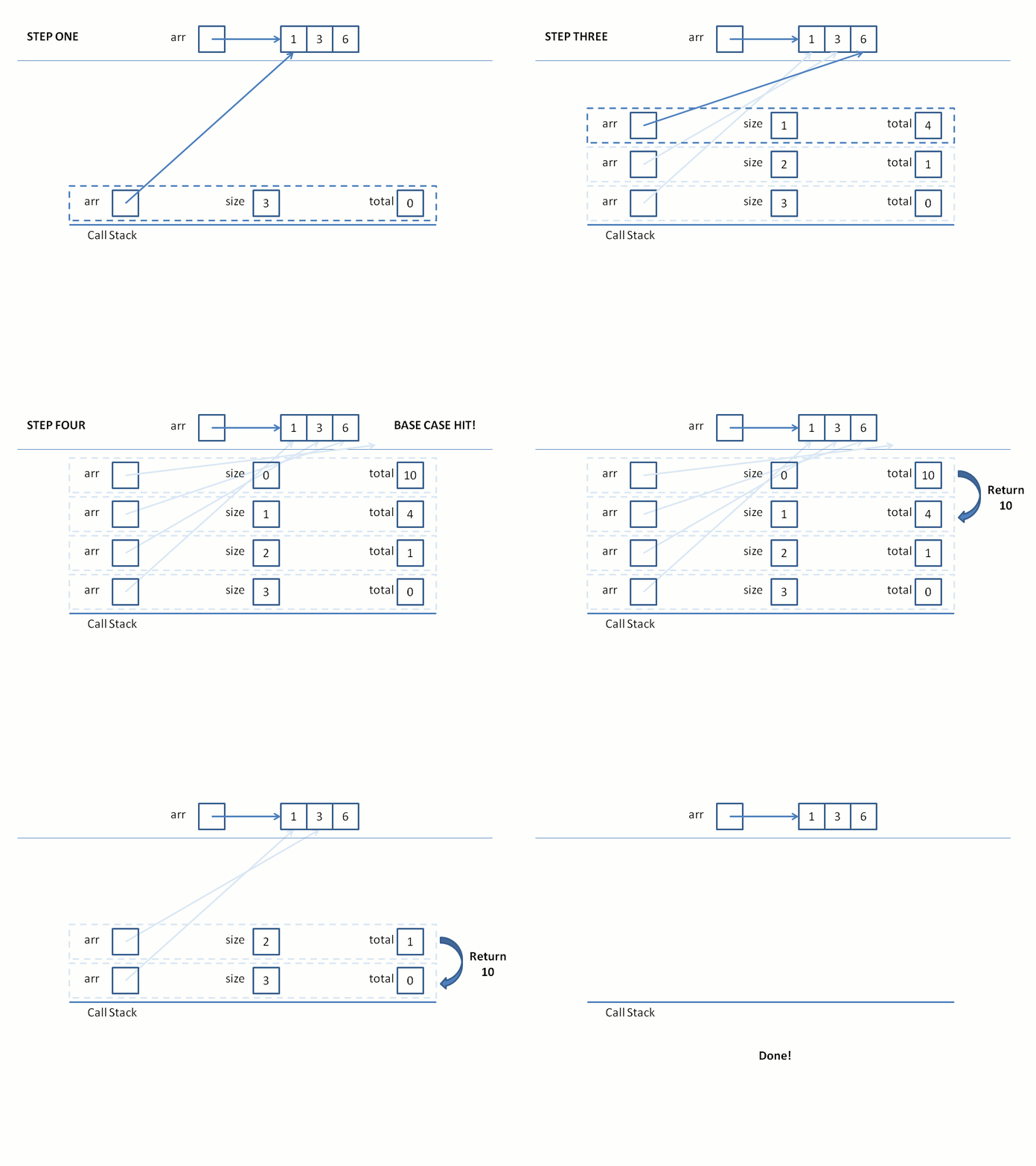
Yeah I haven't mastered the whole gif thing yet so... enjoy all that whitespace above...
OK, here's a function skeleton to get us on our way:
  int sum (const int arr[], int size, int total) {
      // [!] Base case check
      if ( ... ) {
          // [!] Return solution
          return ...;
      }
      // [!] Recursive case; go to next element, dec
      // size, and then add the current front to total
      return sum( ... );
  }
Whenever a recursive call is made, I suspend my position in the current stack frame until the ones above it return.
See how that works?
Divide & Conquer Split
Divide & conquer splits attempt to reduce the size of the problem by some factor with each recursive call.
Unlike the first & rest split, we will attempt to substantively reduce the size of each subproblem, solve the trivial case, and then recombine to the larger problem.
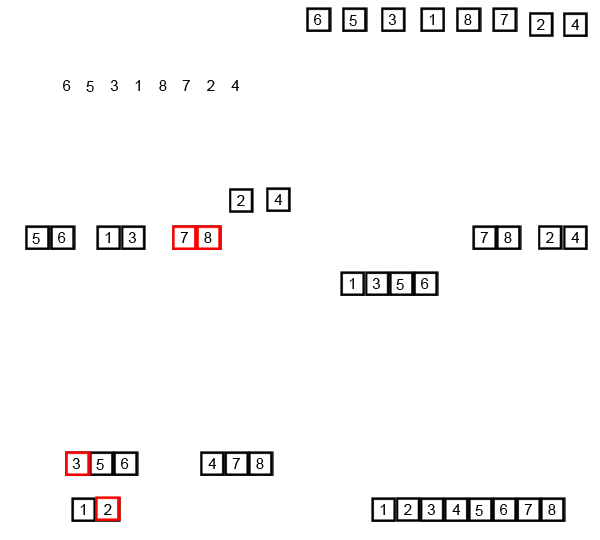
In class, we reviewed mergesort, an algorithm for sorting a list of ints by first dividing the list into subgroups as small as 1, merging the tiniest groups into sorted order (a trivial, binary comparison), and then merging each smaller, sorted list into a larger and larger one until we got the original list, sorted!
Here's the pseudocode we looked at in class:
  void sort (int a[], int b, int e) {
      if (e - b >= 2) {
          int mid = (b + e) / 2;

          // Recursive call on first half of a
          sort(a, b, mid);
          // Recursive call on other half of a
          sort(a, mid, e);

          // Merge those sorted subpropblems!
          merge(a, b, mid, e);
      }
  }

  int main () {
      int arr[] = {4, 3, 1, 2};
      sort(arr, 0, 4);
      // arr will now be {1, 2, 3, 4}
  }
There's a big step of understanding how this works, and it's under the assumption of a working merge function:
Here, the merge function combines the two sublists into a single, ordered sublist.
Let's take a look at it in action (gif shamelessly stolen from Wikipedia):
Practice
There's a rite of passage for all students of recursion: you must solve the Fibonacci problem.
The Fibonacci sequence begins with two 1's, and then continues with each digit being the sum of the two previous.
Here's a sample start of the Fibonacci sequence:
1, 1, 2, 3, 5, 8, 13, 21, ...
Compute the nth Fibonacci number in this sequence using a recursive function.
Hints: the function signature is int Fibonacci(int n);
There are two base cases.
The recursive call breaks into two subproblems... hint, these two are in the problem description!